declaw
everyone can unpin Android TLS until the app detects the injection itself. this is the tool for what you do then. read the session keys off a live process with a hardware breakpoint, or flip the certificate verifier through /proc/pid/mem, with nothing loaded inside the app
Bypassing SSL pinning is a solved problem right up until the app ships anti-tamper. Then it detects your re-signed APK, spots the Frida agent at spawn, and crashes on the first inline hook, and every unpinning script you own is dead. declaw is the tool I built for that cliff. For normal apps it reads the stack and picks the rung: repackage for OkHttp and Flutter, key-log capture for cronet. For the apps that fight back it stops injecting anything at all. It reads the TLS keys straight out of the running process with a CPU hardware breakpoint, or it overwrites eight bytes of the live certificate verifier through /proc/pid/mem, no file change, no frida, no ptrace-attach, so the integrity check has nothing to find. This is all four rungs, the decoy BoringSSL function that eats a naive patch, the negative controls, and declaw-lab, the rooted arm64 rig I had to build on a Linux laptop to prove any of it. Targets are anonymized by stack, not named.
The first time I flipped an app’s certificate check in memory, watched the eight bytes land, and still got a certificate_unknown in my proxy log, I assumed I had a stale offset. I re-pulled the library, re-ran the finder, got the same address, wrote it again. Same hang-up.
The offset was right. The function was wrong. BoringSSL ships two things that look almost identical from the outside: ssl_verify_peer_cert, the one that runs on the handshake, and ssl_reverify_peer_cert, a session-resumption path that in a fresh handshake never executes. Patch the second one and everything reports success. The bytes change, the verifier returns “trusted”, and the app keeps rejecting your cert, because the code you edited was never on the path. It is the cleanest false positive I have hit in a while: a patch that takes, verifies, and does nothing.
That decoy is a good introduction to the actual subject, which is not “how to unpin an Android app”. That part is a solved problem, and I will get to it. The subject is the cliff the solved problem walks off the moment the app is built to notice you.
If you want the part that is not in every other pinning writeup, skip to the two rungs that put nothing into the process: the hardware breakpoint and the in-memory flip. The rest is context for why they have to exist.
the part everyone skips
Search “Android SSL pinning bypass” and every result stops at the same place: install Frida, run an unpinning script, read your traffic. It works. It works on a huge number of apps. And it quietly assumes the one thing a hardened app is specifically built to break, which is that you can get your code, or your hook, or your agent, inside the target process.
A modern anti-tamper packer like PairIP or DexGuard does three things that end that assumption. It verifies the APK signature at runtime, so your re-signed repackaged APK is spotted and killed before it runs. It scans for a Frida agent at spawn, so the injection is caught before your script loads. And it runs a code-integrity check that crashes the process on the first inline hook of a TLS function, so even an agent that gets in dies on the first thing it tries to do. Every technique in every “bypass pinning” post shares the assumption those three checks exist to destroy.
I did not arrive at this from theory. I hit two of those walls in one sitting. A re-signed build of a hardened app died on launch, before its first screen, killed by the signature check. And separately, on a real device running Android 16 on a Tensor core, frida-server would not even stay up long enough to be detected: its Gum engine segfaulted on spawn on that kernel, so there was no agent to catch because the agent could not load at all. Two different defenses, and the same outcome both times, which is that the process I needed to be inside was one I could no longer get into.
So the interesting question is not how to unpin. It is what you do when the app detects the unpinning. declaw is my answer to the whole spread, from the easy majority to that cliff, and the map looks like this.
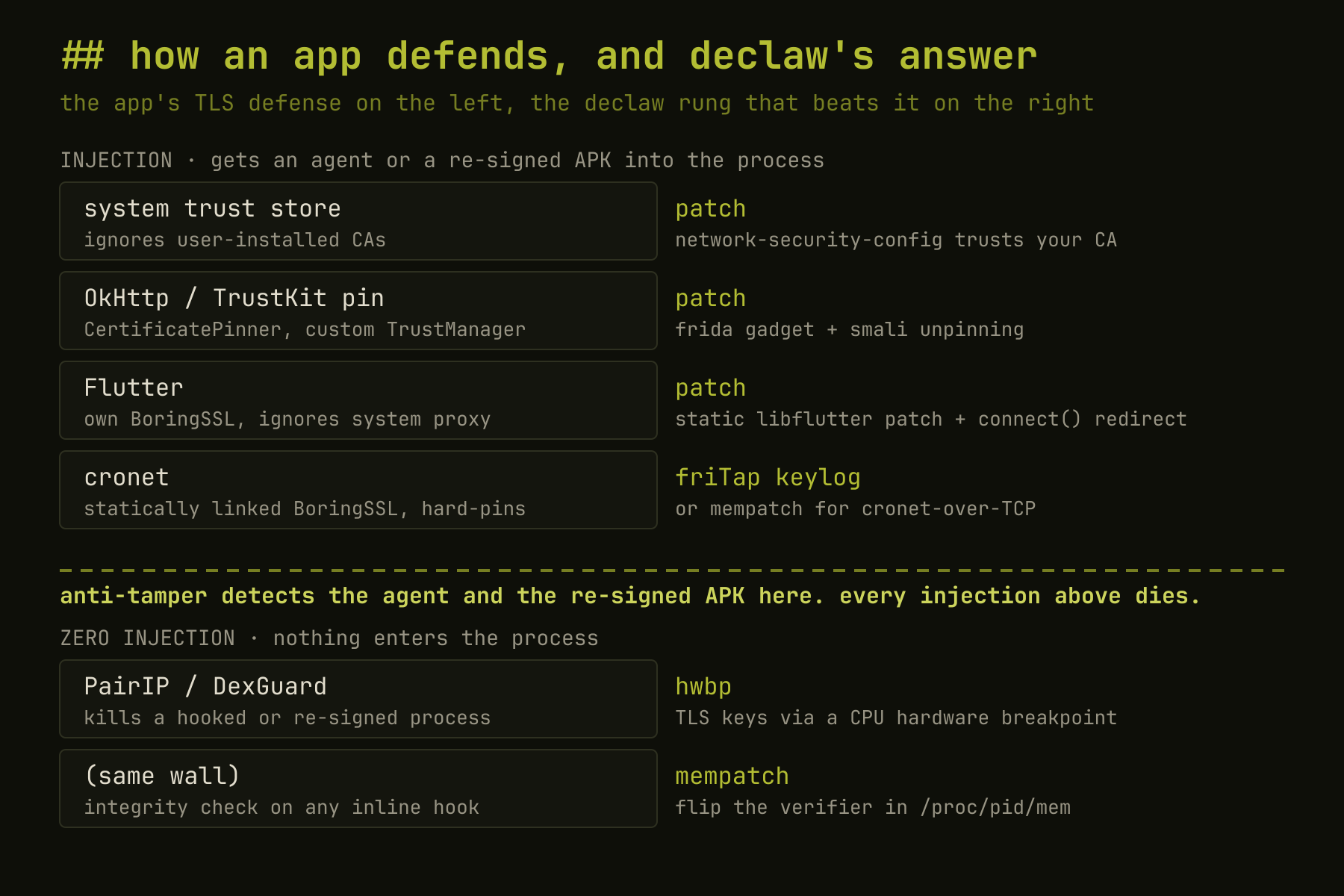
Everything in the top zone puts something into the process: a re-signed APK, a gadget, a frida-server. Anti-tamper is the boundary between the two zones. The bottom two rungs put nothing in, and those are the ones worth writing about, so I am leading with them.
One boundary belongs up front, because it shapes everything below the line. Both of those rungs need root, on a rooted device or an emulator you own. They read and write another process’s memory, and a stock phone does not let you near it: perf_event_paranoid is locked down and SELinux is enforcing, so neither the breakpoint nor the /proc/pid/mem write is even reachable. That is the honest cost of getting under the injection line. On a stock, non-rooted phone you are back above it, in repackage territory, and the anti-tamper app wins. Everything that follows assumes the one place these rungs apply: a device or emulator where you already hold root.
read the keys with a hardware breakpoint
A CPU hardware breakpoint is not code. It is a value the kernel writes into the ARM debug registers, and the core traps when it executes a chosen address, with nothing loaded into the target and not a single instruction changed. There is no agent to detect and no hook to trip an integrity check, because from the app’s point of view its own bytes are exactly as the loader mapped them.
I did not reach for that first. After Frida died and the re-signed build got killed, the obvious next step was one of the ptrace-based key readers, and that is a dead end against a hardened app for a reason I get to below. What I actually needed was a way to catch the exact instant a key is derived, from outside the process, that leaves nothing behind inside it. perf_event_open turns out to be exactly that primitive, and the part that makes it work is not obvious: it can arm a hardware execute breakpoint (HW_BREAKPOINT_X) on an address in a different process, and with PERF_SAMPLE_REGS_USER set, the sample it returns on every hit carries that process’s user register file. No ptrace, no attach, no byte written into the target. The kernel does the trapping in the CPU and just hands you the registers. The channel is the whole point: I am reading another process’s key material with a facility that has no debugger relationship to it at all.
The function to aim it at is ssl_log_secret, and that choice is what makes the rest fall out for free. It is BoringSSL’s own key-log emitter, the function the library calls to write an SSLKEYLOGFILE line, so at the instant it executes its arguments already are the label, the secret pointer, and the length. I never have to reconstruct a key schedule or find a struct offset. I just have to be standing on that address when the library hands itself the key.
declaw’s hwbp mode is that idea wired up. It arms the perf_event_open breakpoint on ssl_log_secret in every thread of the target, rescans as new threads spawn, and on each hit reads the secret and client_random back out of the register file and /proc/pid/mem. Those are the exact bytes the library would have written to SSLKEYLOGFILE, assembled into standard NSS key-log lines that decrypt the capture in Wireshark.
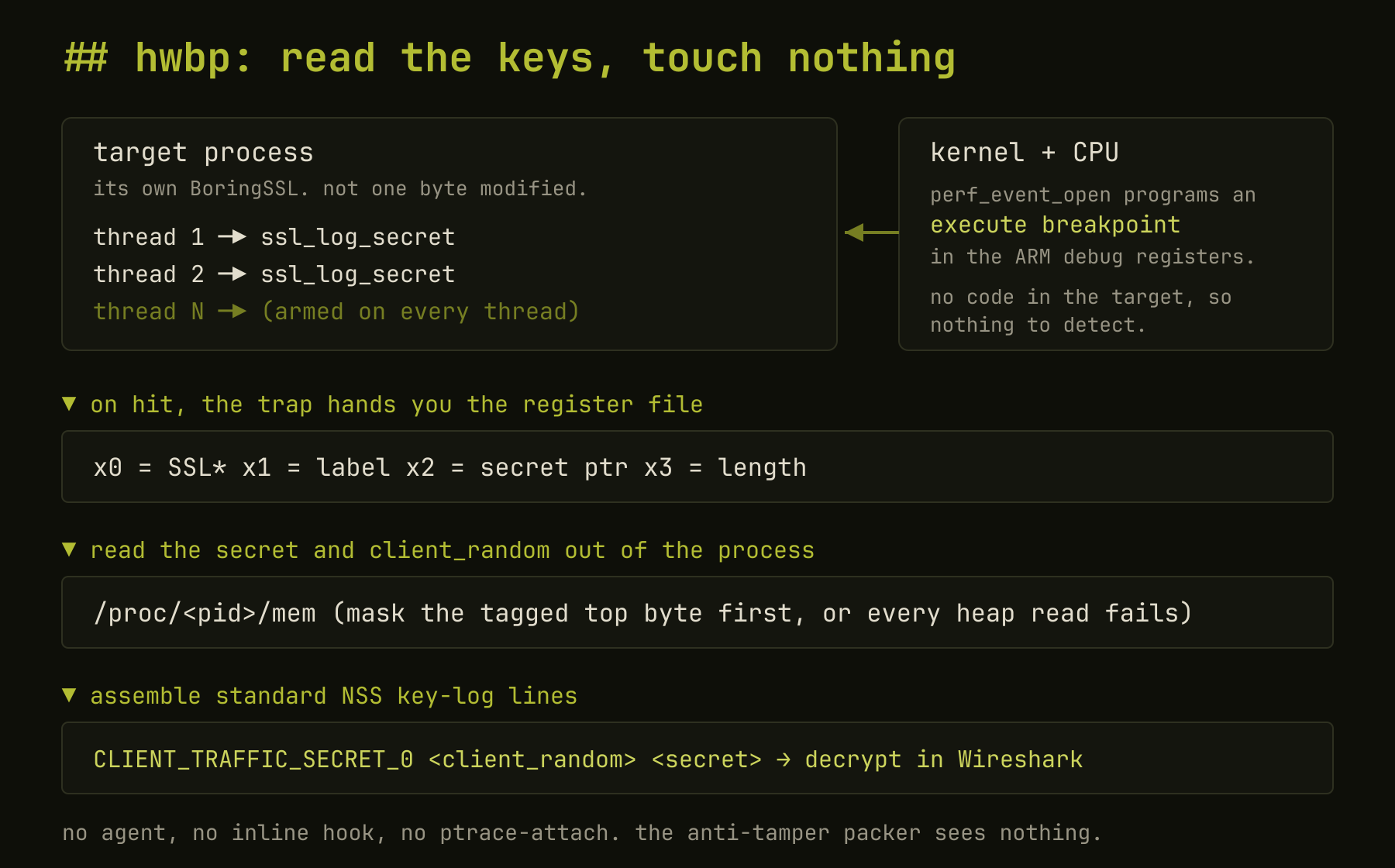
Two details cost me an evening each. Hardware breakpoints are per-task: the debug registers swap per thread on context switch, so arming only the main pid catches nothing, because the app runs its TLS on worker threads. You arm every thread and rescan as new ones spawn. And Android tags heap pointers in the top byte, so the pointer the trap hands you is not a valid /proc/pid/mem offset until you mask the tag off. Until I masked it, the label read fine, because it is untagged rodata, and every heap read failed, which looks exactly like a wrong offset and is not.
Proven on the rig against a live, unmodified, uninjected cronet app: the monitor pulls real TLS 1.3 secrets with the correct BoringSSL labels and full key-log lines including client_random, entirely out of the app’s memory, with zero injection. It needs root, and I will come back to why that is a hard boundary and not a detail.
Claims are cheap, so here is the mechanism proving itself on the rig with the one control that turns it into evidence. A controlled target sets known sentinel bytes as its client_random and secret, then calls ssl_log_secret in a loop. A separate monitor process, nothing injected into the target, arms the breakpoint and reads them back.
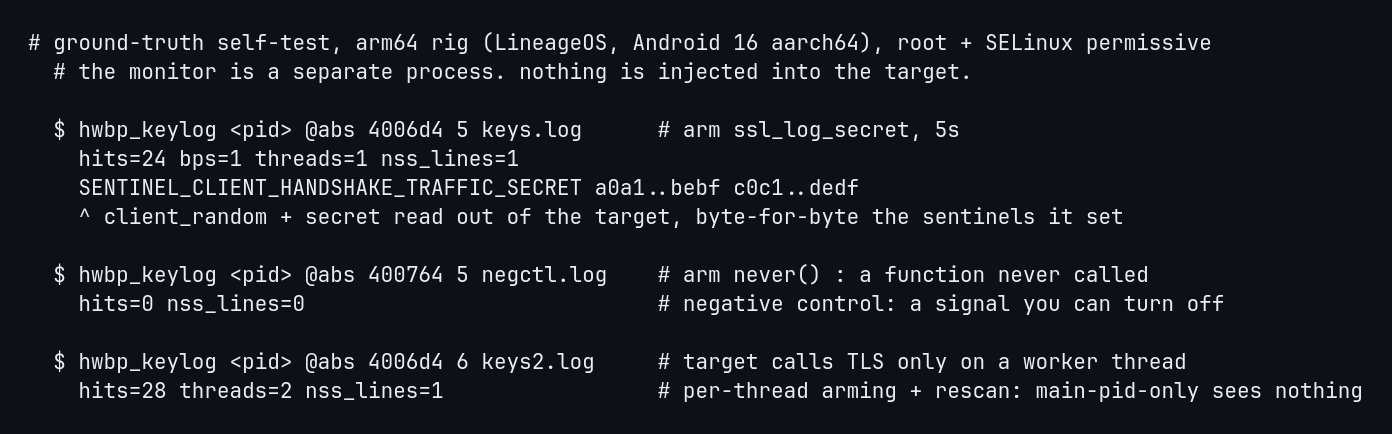
Three runs, one job each. The first recovers the sentinel byte-for-byte out of the target’s memory. The second arms a function that is never called and gets zero hits, because a hardware breakpoint only fires on executed code and a signal you cannot switch off on demand is not a signal. The third has the target touch TLS only on a worker thread and it still lands, which is the per-task arming from a moment ago: arm the main pid alone and you catch nothing.
Reading TLS keys out of a live process is not a new idea, and it would be dishonest to imply otherwise. There is real prior art: DroidKex, TLSkex, and TeLeScope in academia, and tlsdump as the closest open-source design. Every one of them attaches with ptrace. That is the difference that matters against a hardened app, because ptrace-attach is exactly what an anti-debug check watches for, and a traced process can read its own tracer straight out of /proc/self/status. A hardware breakpoint is programmed by the kernel into the CPU debug registers with no ptrace relationship to the target, and the mempatch write below goes through /proc/pid/mem, which is a privileged read-write, not an attach. Same goal as the prior work, through a channel the anti-tamper packer is not watching.
The modern version of that question is eBPF, not ptrace. Tools like ecapture read the same ssl_log_secret with an eBPF uprobe, no frida and no ptrace, so it is fair to ask why not just do that. Because a uprobe is not as free of the target as it looks. The kernel installs it by writing a trap instruction into the function, a breakpoint byte with the original saved for single-step, into a copy-on-write page the process then reads as its own code. An app that hashes its own .text, which is what a code-integrity check like PairIP’s does, sees that byte. The hardware breakpoint writes nothing into the process; it lives in the CPU debug registers, and the code stays identical to what the loader mapped. That is the claim worth making, and it is stronger than “not ptrace”: of every way to watch ssl_log_secret fire, the debug register is the one that changes zero bytes of the target and is not a ptrace attach, so neither the integrity check nor the anti-debug watch has anything to fire on.
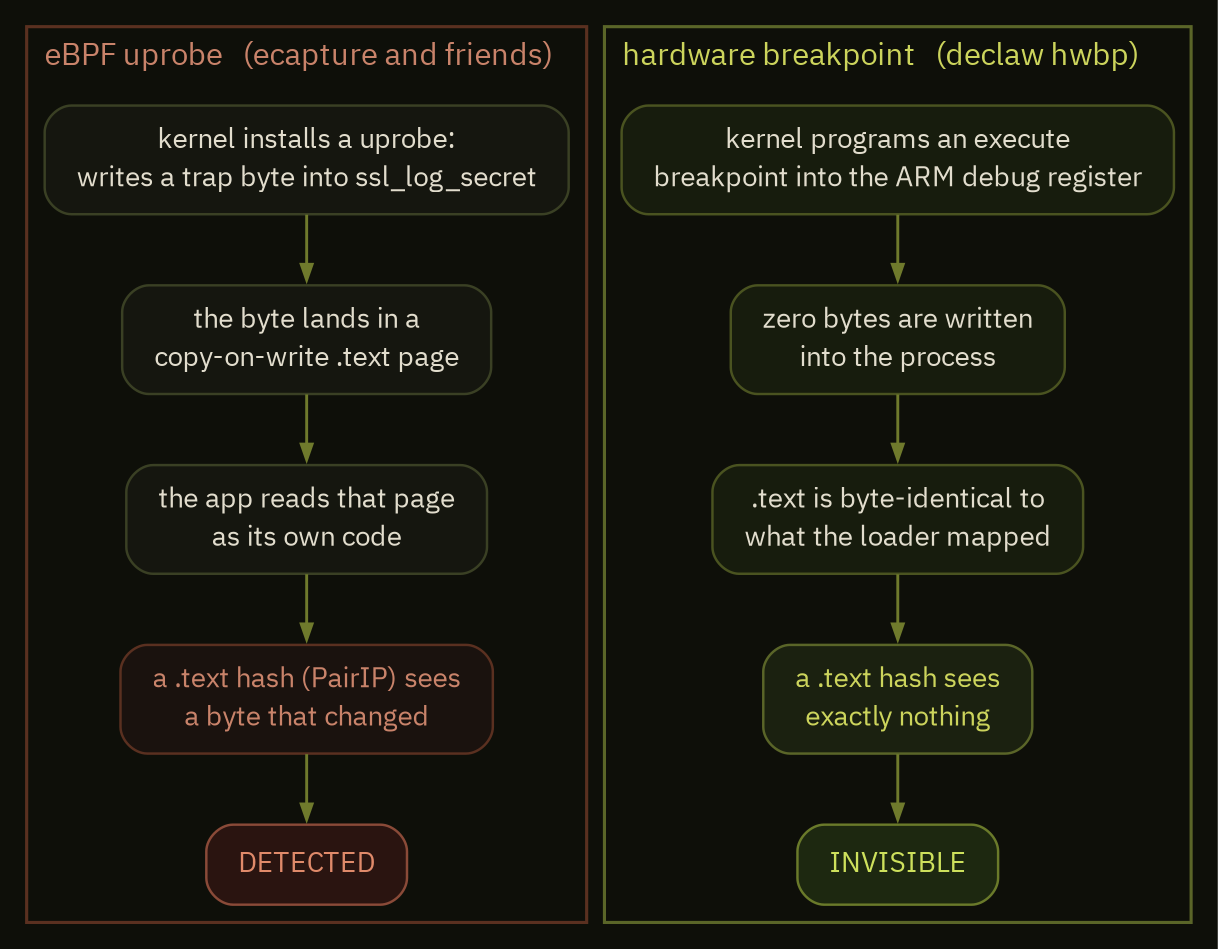
The whole difference is one column of that picture. Both read the same function at the same instant. One leaves a byte in the process and one does not, and against an app that hashes its own code that byte is the entire game.
flip the verifier in the running process
The breakpoint reads. Sometimes you would rather write once and let the app talk to your proxy normally, no capture to decode afterward. That is mempatch, and it is the rung the decoy at the top belongs to.
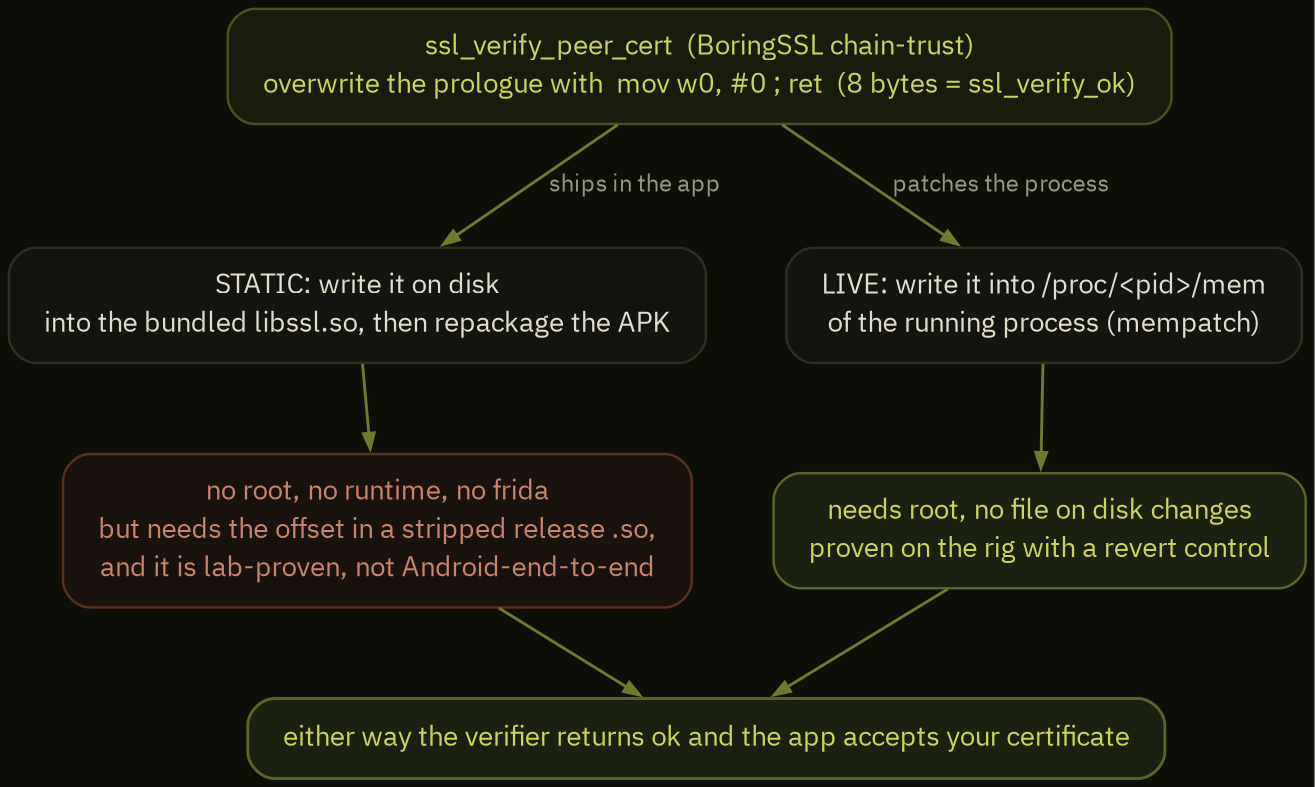
The idea is small. Find ssl_verify_peer_cert in the running process and overwrite its first two instructions through /proc/pid/mem with mov w0, #0 ; ret, where 0 is BoringSSL’s ssl_verify_ok. Eight bytes. The APK on disk is untouched, so its signature check still passes; no frida loads, so there is no agent to spot; and a /proc/pid/mem write is not a PTRACE_ATTACH. The app keeps running while its TLS quietly accepts your certificate.
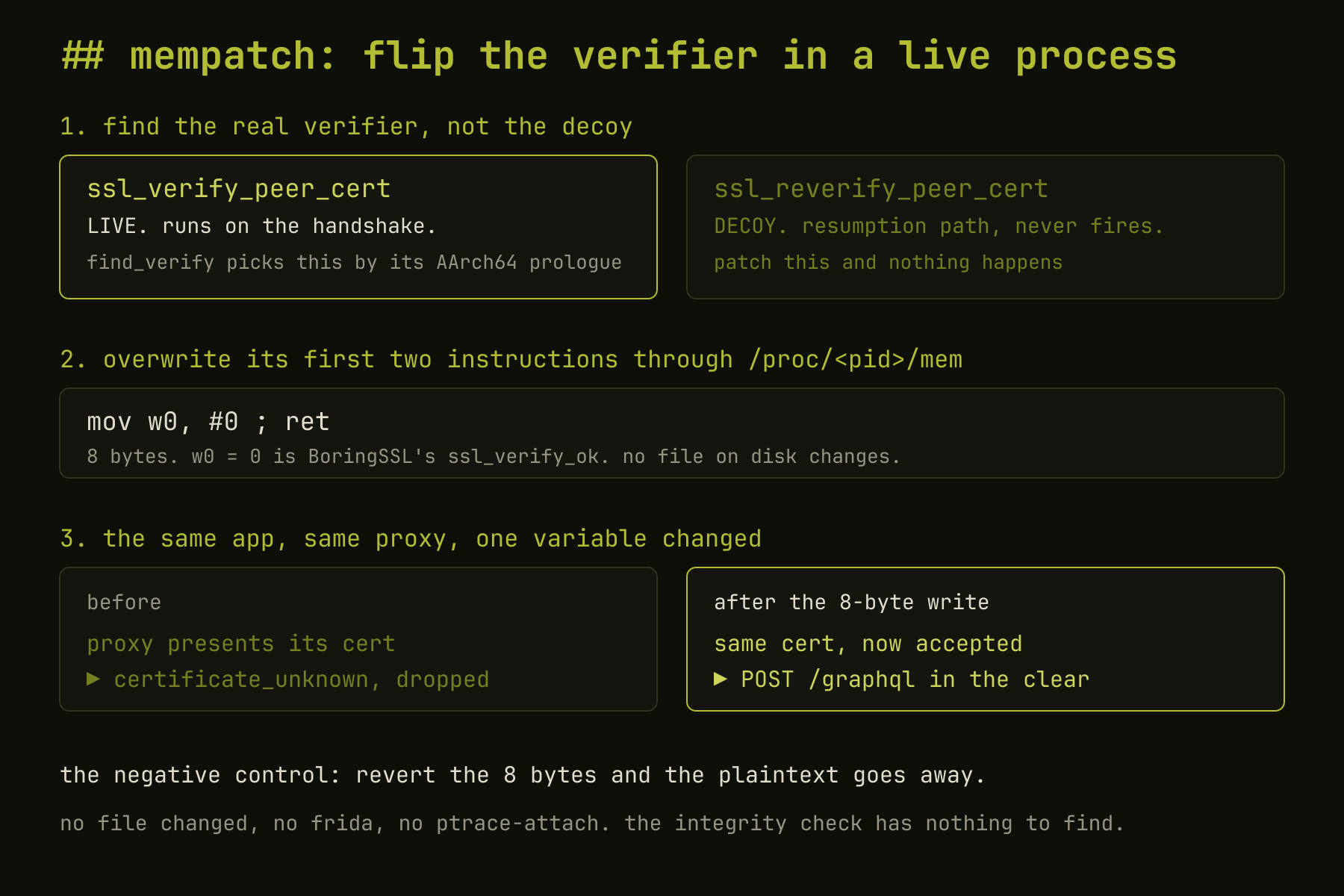
For cronet this is the same function. Chromium registers its net::CertVerifier through BoringSSL’s SSL_set_custom_verify, and ssl_verify_peer_cert is what calls that callback, so flipping it defeats cronet’s pin over TCP. HTTP/3 is the honest exception: a cronet HTTP/3 request rides QUIC over UDP, which a TCP proxy never sees, so there you go back to the key-log path regardless of what you patched.
That key-log path is not a fallback in name only, and cronet is where it earned the spot. cronet statically links its own BoringSSL and pins against it, so a system CA does nothing and there is no separate libssl.so to point a patch at. friTap reading the traffic secrets straight out of that bundled BoringSSL took the pin apart anyway, and a real cronet-backed endpoint came out decrypted in Wireshark. The pin holds the handshake. It was never holding the keys.
And you have to patch the right function, which is the whole story I opened with. find_verify disassembles both candidates and picks the live ssl_verify_peer_cert over the ssl_reverify_peer_cert decoy by their AArch64 prologues, because the decoy patches just as cleanly and buys you nothing.
On the real Android 16 conscrypt BoringSSL that is the live function at file offset 0x5aa30 and the decoy at 0x5ad30, and the difference between them is a single instruction.
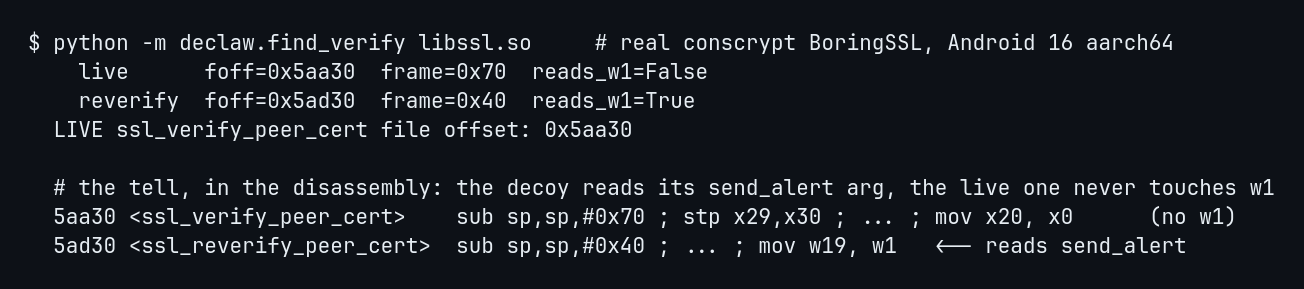
The decoy takes a second argument, send_alert, and reads it near the top with mov w19, w1. The live function takes one argument and never touches w1. That one read is the entire discriminator, and the function that has it is the one I patched by mistake.
The decoy is the wrong function inside the right library. There is a second trap that is the wrong library entirely, and I walked into it too. An app that bundles cronet ships its own stable_cronet_libssl.so, and that filename contains libssl.so, so a loose match on libssl.so@0x5aa30 resolves to cronet’s copy instead of conscrypt’s. The write took, the bytes read back exactly as intended, the tool printed success, and nothing decrypted, because I had flipped the verifier in a BoringSSL that was not the one running the handshake. Both traps have the identical shape, a patch that lands, verifies, and does nothing, and that shape is the argument for the discipline the whole post is built on: name the exact library, com.android.conscrypt/lib64/libssl.so@auto, let find_verify pick the live function inside it, and never trust a success you cannot turn back off.
The negative control is the part I trust, because “the app loaded” is not evidence the bypass worked. Here it is fresh on the rig against a neutral target, the F-Droid client fetching its repo over conscrypt. A throwaway proxy presents an untrusted cert. Before the patch, conscrypt refuses it with certificate_unknown. After declaw writes the eight bytes into the live ssl_verify_peer_cert (the before bytes are sub sp,#0x70 ; stp x29,x30, the real prologue, so it landed on the function and not the decoy), the same request in the same process comes out in the clear.
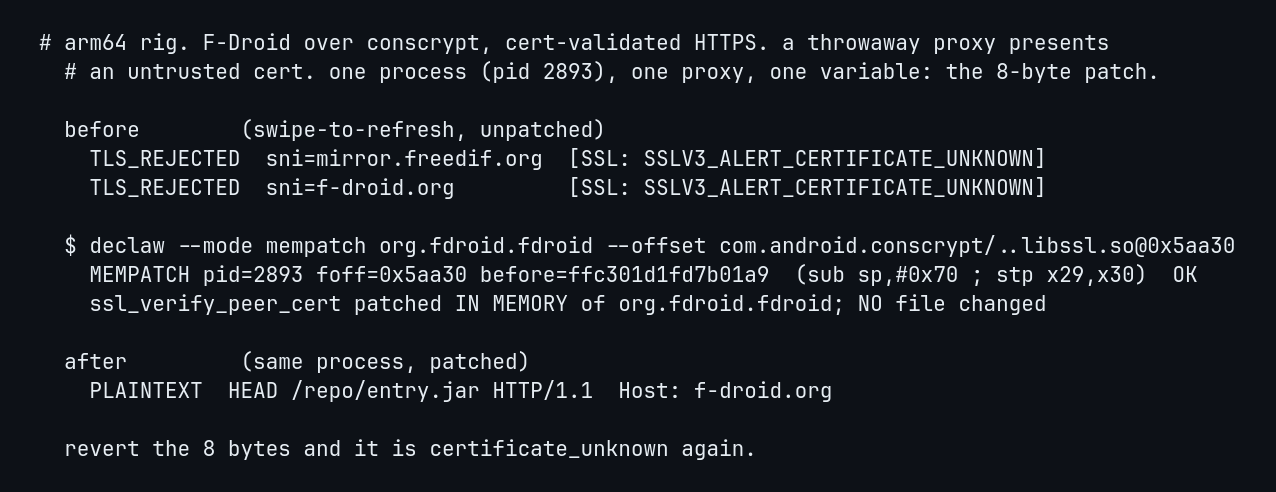
Revert the eight bytes and it is certificate_unknown again. One variable, toggled, and the traffic appears and disappears with it. That is the control I can hand you: a neutral target, patched and unpatched in the same process, on the rig, and it is the run I trust because it is the one I can turn off on demand.
The same eight bytes carry to an app built to notice, and I want to be exact about the evidence there. Against a PairIP-hardened, pinned target, the unpatched process dropped the connection with certificate_unknown, and after the flip the same process emitted a POST .../graphql request in the clear. Nothing was hooked and no file on disk changed, so the code-integrity check had nothing to fault, which is the entire reason this rung exists. But I am keeping that target anonymous, so what you get for it is the mechanism and not a captured, reverting control like the neutral one above. The strong, reproducible evidence in this post is the F-Droid run; the hardened run is the identical primitive against a name I will not print. I would rather say that plainly than dress an anonymized result up as proof.
Two things the flip deliberately does not do, and you have to handle both. It does not touch the Java-layer hostname check, so the proxy mints a per-SNI leaf to satisfy it. And, more importantly, it does not touch a Java-layer certificate pin. ssl_verify_peer_cert is BoringSSL’s chain-trust decision, but OkHttp’s CertificatePinner runs up in Java, after the handshake, comparing the peer chain against pins the app hardcoded, and the eight bytes never reach it. So mempatch is the rung for native trust: conscrypt, cronet, and the packers that pin below the Java layer. Where the pin lives in OkHttp itself, flipping BoringSSL is not enough, and that app goes the repackage route instead, which is the next section.
getting an agent past PairIP’s guard dog
The two rungs above win by putting nothing in the process. There is a third case that does the opposite on purpose. cronet’s keys come out through friTap, and friTap injects: it spawns under Frida and sets inline hooks on the app’s own BoringSSL. Under a PairIP-hardened app that is exactly the thing that dies at spawn. So before friTap reads a single key, something has to keep PairIP’s guard dog from noticing it.
PairIP’s antidebugger, reverse-engineered from a real libpairipcore.so and a published decompile of its antidebugger(), is a handful of checks that all funnel through one place. It calls ptrace on itself to see if anyone is already attached. It fork()s a child whose only job is to ptrace-scan the parent. It walks /proc and dl_iterate_phdr for frida, a gadget, a nonzero TracerPid. And it calls abort() the instant any of that trips. The useful part is that none of it goes through named wrappers. It calls libc syscall() directly, so one hook covers the lot.
declaw’s anti_pairip.js, loaded into friTap at spawn, sits on that choke point and answers each check with the boring correct lie.
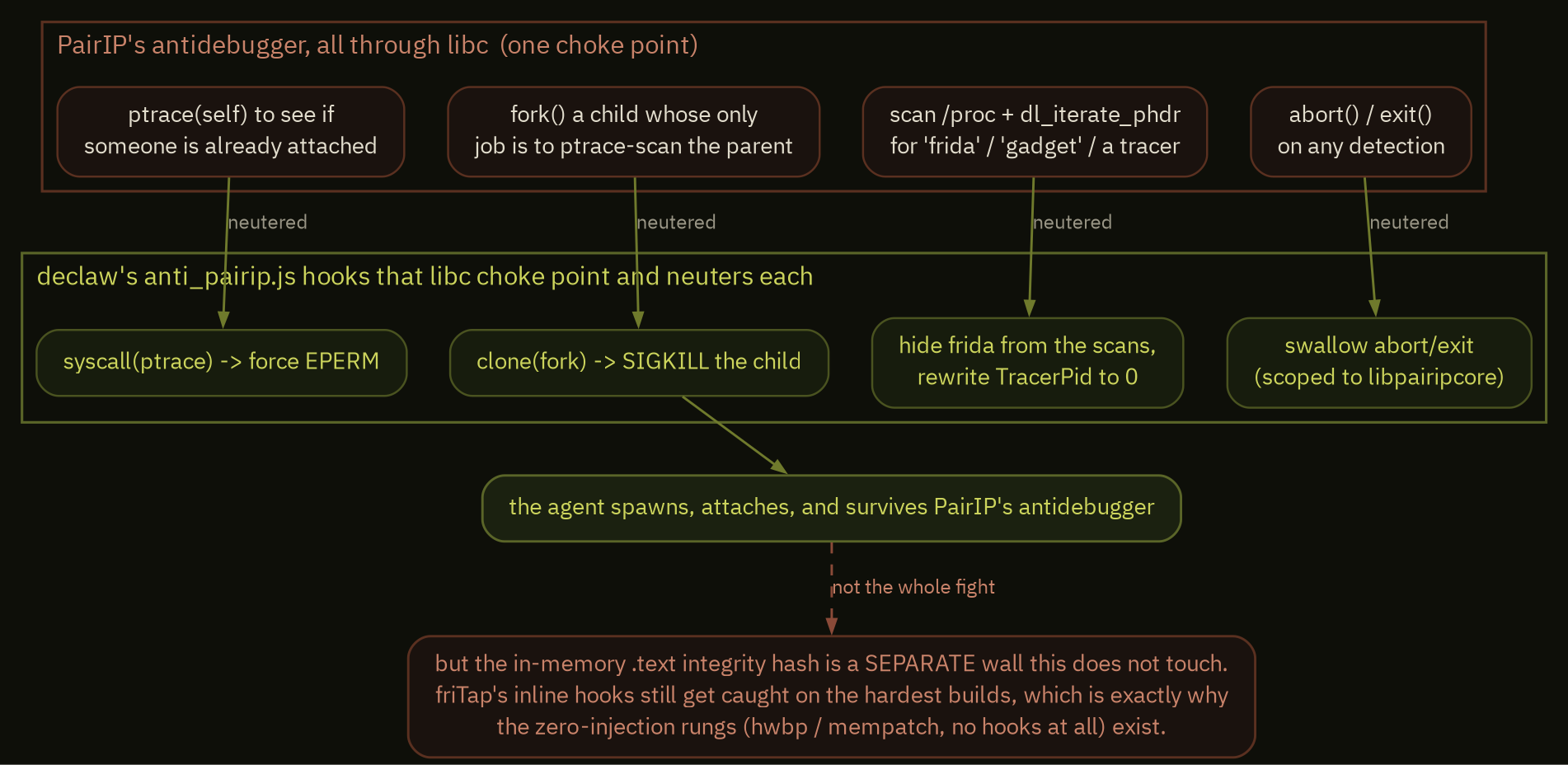
syscall(ptrace, ...) returns EPERM, so the self-check sees no tracer. clone() with flags == 0 is a real fork(), and the child that comes back gets SIGKILL before it scans anything. The /proc reads get their frida lines filtered and TracerPid rewritten to 0, and the dl_iterate_phdr walk never sees the gadget’s module. abort and exit, scoped to callers whose return address is inside libpairipcore, get swallowed. The agent spawns, attaches, and stays alive.
There is a matching move on the other side of the same scan. The frida-server binary declaw pushes is renamed on the device, and optionally its frida / GumScript symbols, strings, and thread names are stripped out of the binary itself, so a packer that scans process names and loaded strings for frida finds nothing. That rewrite is off by default, because on some Frida versions it corrupts the agent and crashes the target, so it is there for the specific case where server detection is the thing blocking you and nothing else is.
Now the honest part, because this is an arms race and the tool says so itself. This defeats the antidebugger. It does not touch PairIP’s other wall, the in-memory hash of its own .text. friTap’s inline hooks change bytes in the process, and a build that hashes itself still catches them, anti_pairip.js or not. So this gets an agent past the guard dog, not past the fence, and on the hardest builds the answer is still the two rungs that hook nothing. It is grounded in reverse engineering and it is generic, which is another way of saying some hardened apps resist it. One more thing I will be blunt about: it was a silent no-op on the Frida 17.x this tool actually ships until I caught that in an audit and fixed it, so what I can vouch for is the mechanism, not a fresh end-to-end run against a current PairIP build.
and for everything that does not fight back
Most apps do not ship anti-tamper, and for those the answer is the boring, reliable rung, which is also where declaw earns its keep as a tool instead of a technique. Doing this by hand means identifying the pinning library, adapting a Frida script to it, fighting the app that ignores your system proxy, then repacking, re-signing every split, and reinstalling, and redoing all of it for the next app. declaw reads the APK, tells you the stack, and picks the rung for you.
The routing is a short decision tree over what the bundle actually contains, in a fixed order. Two of the branches force a capture instead of a patch, and those are the ones that matter: cronet, because its pinned BoringSSL is bundled and no CA or config will ever move it, and anti-tamper, because a re-signed APK is the exact thing it exists to kill. Everything else falls through to a patch built from whatever framework the app is actually using.
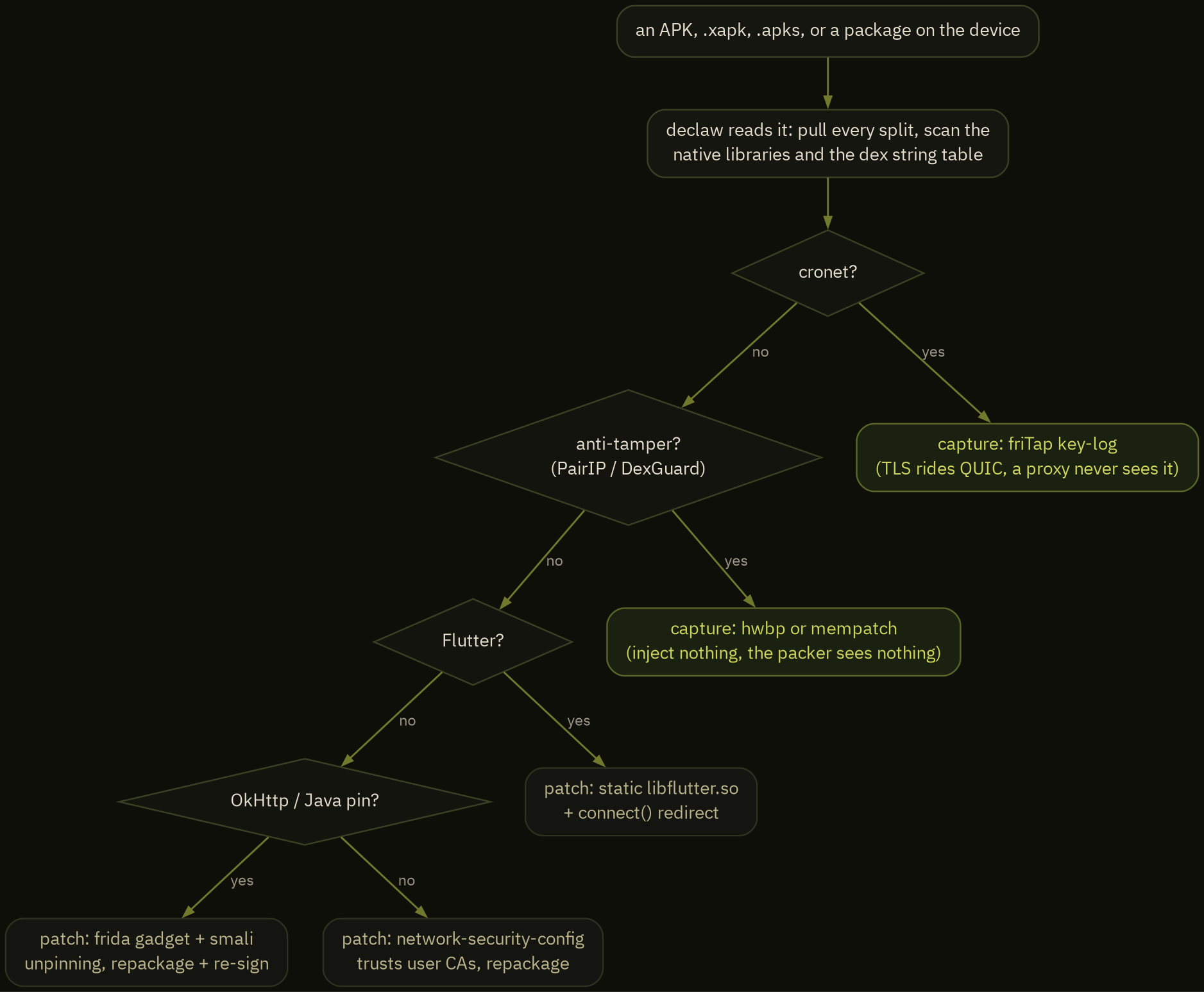
That decision tree is the strategy() function, not a description of it. It runs against the pulled bundle before anything is patched, which is why declaw can refuse to hand you an APK that would only get rejected or killed.

That is a real run against the open-source F-Droid client. declaw pulled the base and every split, scanned the native libraries and the dex string table, found OkHttp with Java pinning, and routed to the repackage path, all before touching apktool. Point it at a package on a device or a local APK, .xapk, .apks, or .aab, and it handles the rest:
- a
network_security_config.xmlthat trusts user CAs, for the plain system-trust case, - the Frida gadget dropped into every ABI, with the public httptoolkit/frida-interception-and-unpinning bundle beside it, loaded from the Application class’s smali at process start. Android 15+ refuses to map a
.sowhose LOAD segments are 4 KB-aligned, and the gadget ships 4 KB-aligned, so declaw re-aligns the injected gadget to 16 KB first or it SIGSEGVs on a Pixel 8, - the native
connect()hook that redirects the app’s outbound TCP to your proxy, which is the only thing that gets Flutter and every other proxy-ignoring app to reach Burp at all, - the OkHttp
CertificatePinner.check()method patched to a no-op straight in smali, and the same no-op treatment for TrustKit’sPinningTrustManagerand appmattus’sCertificateTransparencyTrustManager.checkServerTrusted, the Java-layer pins that mempatch deliberately cannot reach, plus the httptoolkit root-detection disable hook, - a static byte-patch of
libflutter.so, or reFlutter’s pre-patched engine swapped in when the engine’s snapshot hash is one it publishes, for Flutter apps, so the bypass survives even where the gadget cannot load, - a static byte-patch of a bundled non-Flutter BoringSSL (
libttboringssl.soand friends), the on-disk counterpart to mempatch’s live flip, - and the whole repack, parallel re-sign, and
install-multipledance with apm installsession fallback, all cached underutils/so the first slow download is the only slow one.
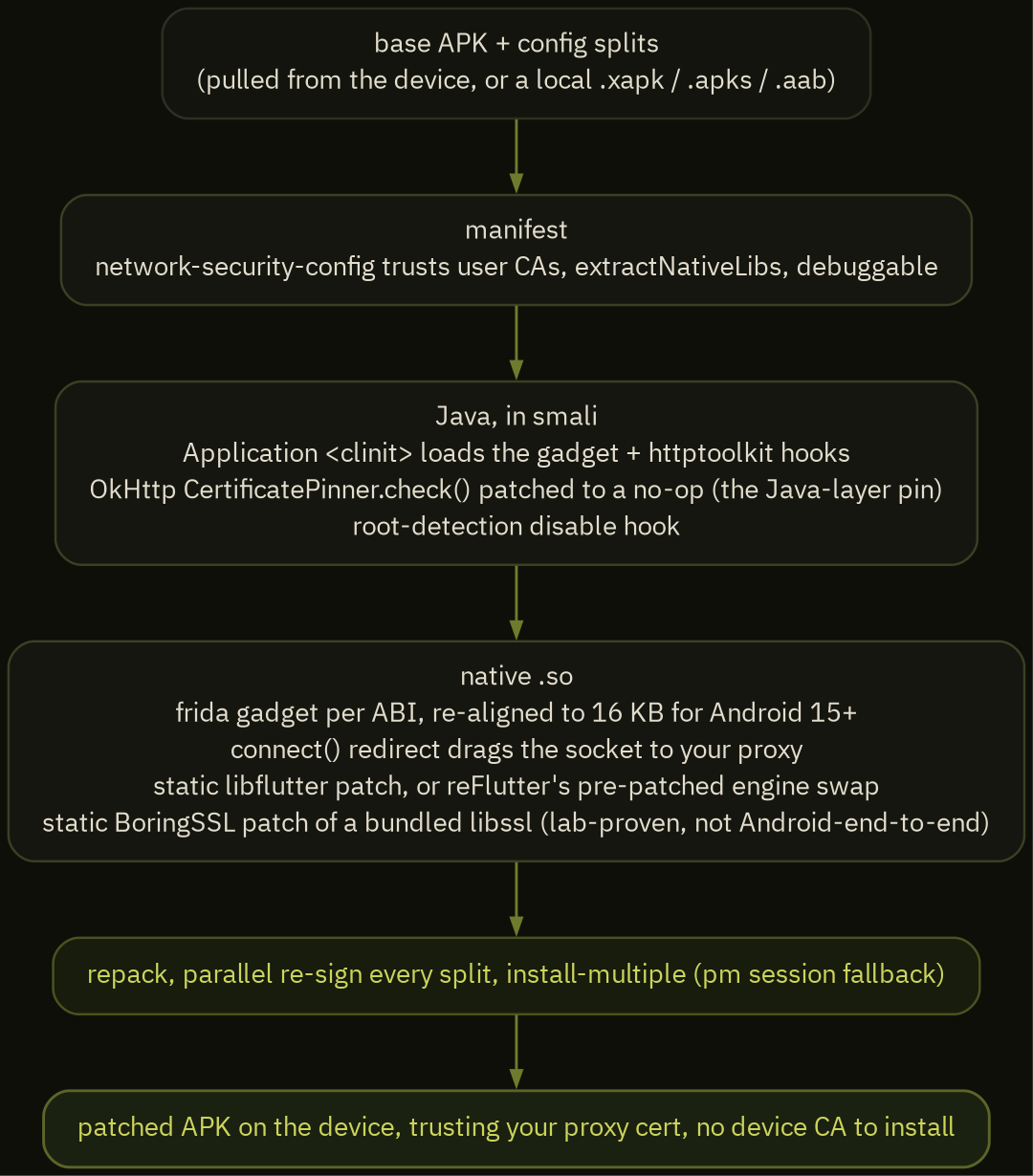
The Flutter static patch is the rung I lean on hardest, because the gadget is the fragile part of this whole path. The same Frida Gum crash that killed injection on the hardened app also makes the gadget unreliable on newer devices, and a Flutter app ignores your system proxy on top of that, so you can have a gadget that loads and still see no traffic. Patching ssl_verify_peer_cert inside libflutter.so on disk sidesteps both problems at once: no agent to crash, and the connect() redirect drags the socket to your proxy regardless. That combination is what got a real Flutter banking app decrypting cleanly into my proxy end to end, on a build where the gadget alone had gotten me nothing.
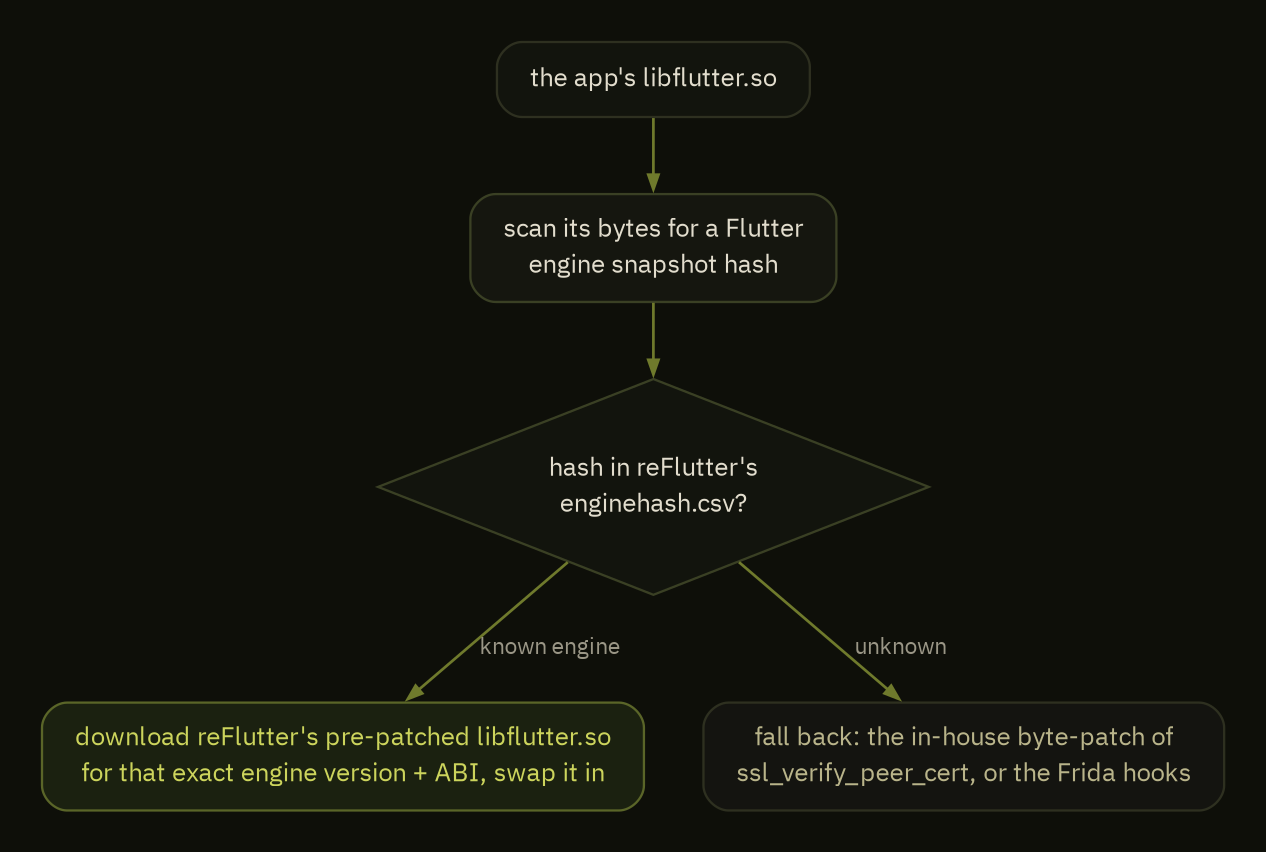
There is a second Flutter layer under that byte-patch, and it is less hand-rolled. reFlutter publishes whole pre-patched Flutter engines, keyed by the engine’s snapshot hash. So declaw reads the app’s libflutter.so, finds the snapshot hash sitting in its bytes, and if that hash is one reFlutter knows, it downloads the matching pre-patched engine for that exact version and ABI and swaps the whole .so in, no byte-surgery at all. When the hash is one it does not publish, declaw falls back to its own byte-patch or to the Frida hooks.
Two of those patches close gaps the in-memory rungs leave. The OkHttp CertificatePinner.check() no-op reaches the Java-layer pin mempatch cannot: the smali patch removes the pin at its source, before the handshake runs, which is why an OkHttp-pinned app takes this route instead of the eight-byte flip. And the static BoringSSL patch is the on-disk version of mempatch for a device with no root: overwrite ssl_verify_peer_cert’s prologue in a bundled libssl.so so it returns ssl_verify_ok, ship the patched .so in the repackaged APK, and there is no frida and no live process to catch. I want to be exact about how far that last one is proven, because it is the least battle-tested thing in the tool. The eight-byte stub is byte-exact and unit-tested, and against a from-source BoringSSL in the lab it made a verifying client accept a self-signed cert with a clean negative control. What it has not cleared here is the full loop: a real Android repackage, re-sign, and run against a live pinned app, plus locating the offset in a stripped release .so. So it is a proven primitive on a known BoringSSL, not yet a proven end-to-end bypass on an arbitrary app.
When it detects cronet or an anti-tamper packer, it says so and routes you to the capture rungs instead of handing you a patched APK that will be rejected or killed. One command reads the app and picks the fight it can actually win. That is the part that makes it a tool.
declaw-lab: proving the hard rungs on Linux
Every rung past the first leans on the same thing: root, arm64, and the app’s real BoringSSL in a real process. The standard x86_64 Android emulator gives you none of it cleanly. It cannot run arm-only builds, its ARM translation layer SIGSEGVs Frida’s native hooks, and the hardware-breakpoint finder and mempatch stub are arm64-only by construction. So to test any of this honestly on an x86 Linux laptop, with no ARM hardware in the room, I needed a rooted arm64 Android I fully controlled.
A real rooted phone was not the clean answer either, and I spent a while learning that. On the phone I had, app traffic egresses over the cellular modem, on rmnet, not the USB link back to the host, so a transparent proxy on the laptop never saw a packet of it. frida-server also crashed on that device’s kernel, the same Gum segfault from the top. Between the network path I could not see and the injection I could not run, the only way to get a clean, repeatable capture was an environment I owned end to end, from the CPU arch up to the route the traffic takes off the device. That is declaw-lab: two backends, one ./lab entrypoint, all on a Linux host.
Standing it up was its own fight. There is no prebuilt multilib LineageOS image, so the first version tried to build one from source, which wants 64 GB of RAM and 400 GiB of disk and OOM-killed soong on a 31 GiB laptop because the module graph has to stay resident. The version that actually deploys is smaller: a pinned 1.1 GB virtio_arm64only prebuilt that fetches, verifies against a known hash, and gets rooted in place. The rig ships as a LineageOS user build that is hostile to headless root, so provision byte-patches the raw disk (AVB is orange, nothing verifies it): the vendor_boot cmdline gains androidboot.selinux=permissive, without which the gralloc path hits a /dev/udmabuf denial and SurfaceFlinger crash-loops before it ever boots, and build.prop gets ro.debuggable=0 -> 1 and ro.adb.secure=1 -> 0 so adb root runs and the device comes up authorized. One command later you have a rooted, permissive Android 16.
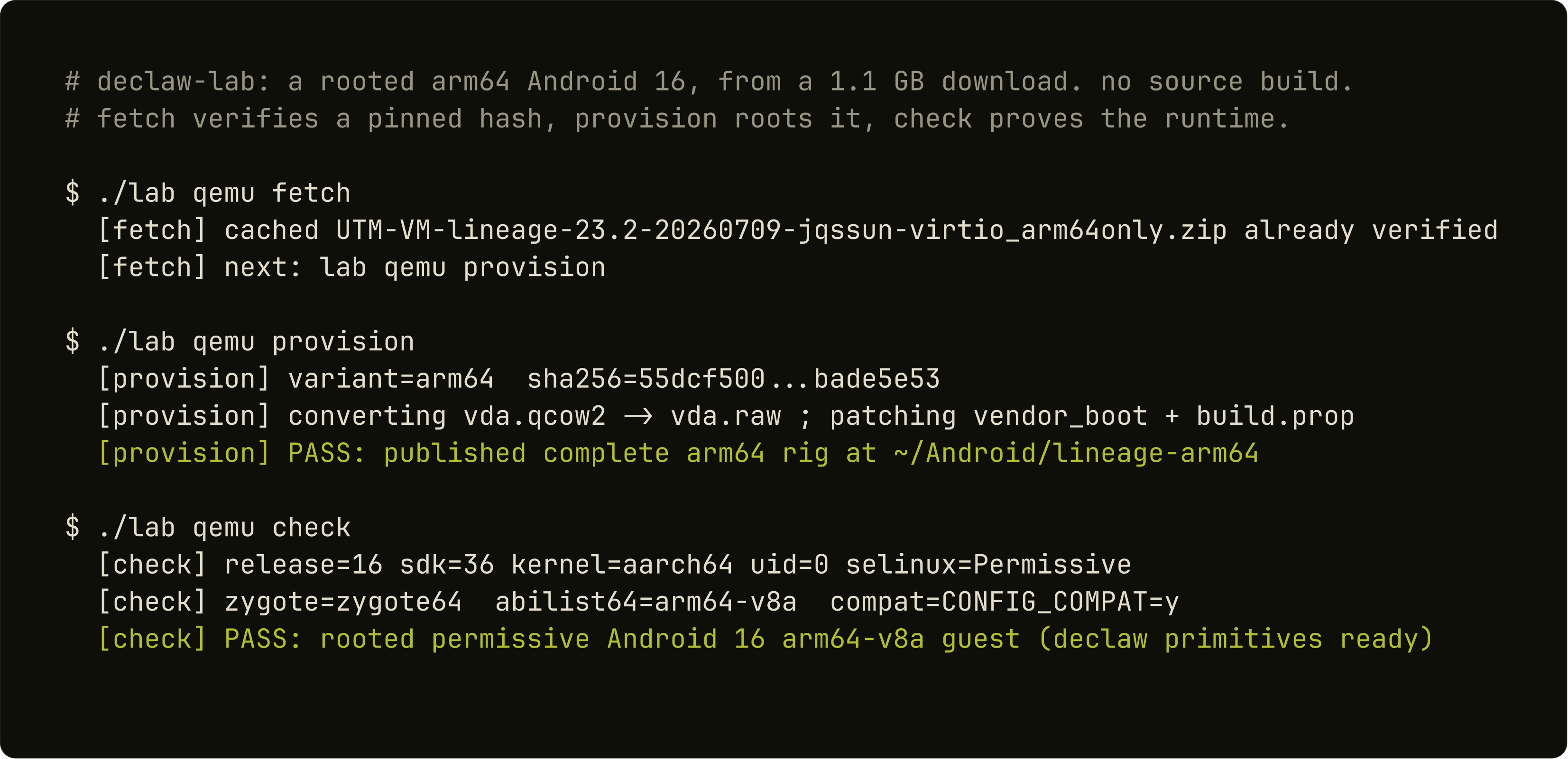
That prebuilt is the qemu backend, booted under qemu-system-aarch64 from your distro’s own qemu package with edk2 firmware. The arm64 instructions execute as guest code, not through an x86 native bridge. On an x86 host the CPU is necessarily QEMU TCG software translation, not physical ARM silicon and not KVM, and I am not going to pretend otherwise. What you can do is make TCG hurt less, and the boot runs with multi-threaded TCG spread across host cores, pauth-impdef so pointer-authentication emulation stops being a tax, a gigabyte of translation-block cache, and the vCPU threads pinned to physical cores. It is the only backend that runs declaw’s arm64 primitives, which is the entire reason it exists.
The avd backend is the fast lane: a rooted x86_64 Google emulator on KVM, for the OkHttp, network-security-config, and static-Flutter work that does not need real ARM. It was throwing away its own boot, though. The emulator launched with -no-snapshot, which disables quick-boot entirely, so every run paid a full cold boot.
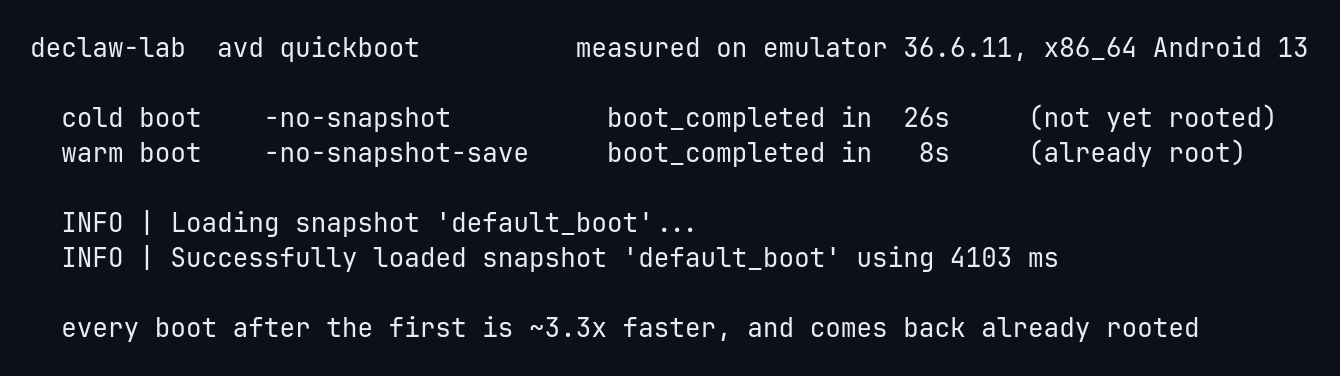
The fix was one flag with a caveat I had to check by hand. -writable-system is why quick-boot was off in the first place, because a writable system image can invalidate the snapshot, and older emulators refused the combination. The current one does not. So the lab boots cold once, saves a rooted snapshot, and every later run restores it with -no-snapshot-save. The emulator loads that snapshot in a few seconds and the device comes back already root, instead of paying a full cold Android boot, and -no-snapshot-save never overwrites the snapshot, so each run still starts from the same clean state.
Everything folds into one command. Point a backend at a patched APK and it boots the device, installs, redirects that app’s 443 to a host MITM, and opens a scrcpy window, and because a declawed app accepts any cert there is no device CA to install, which is the whole point.
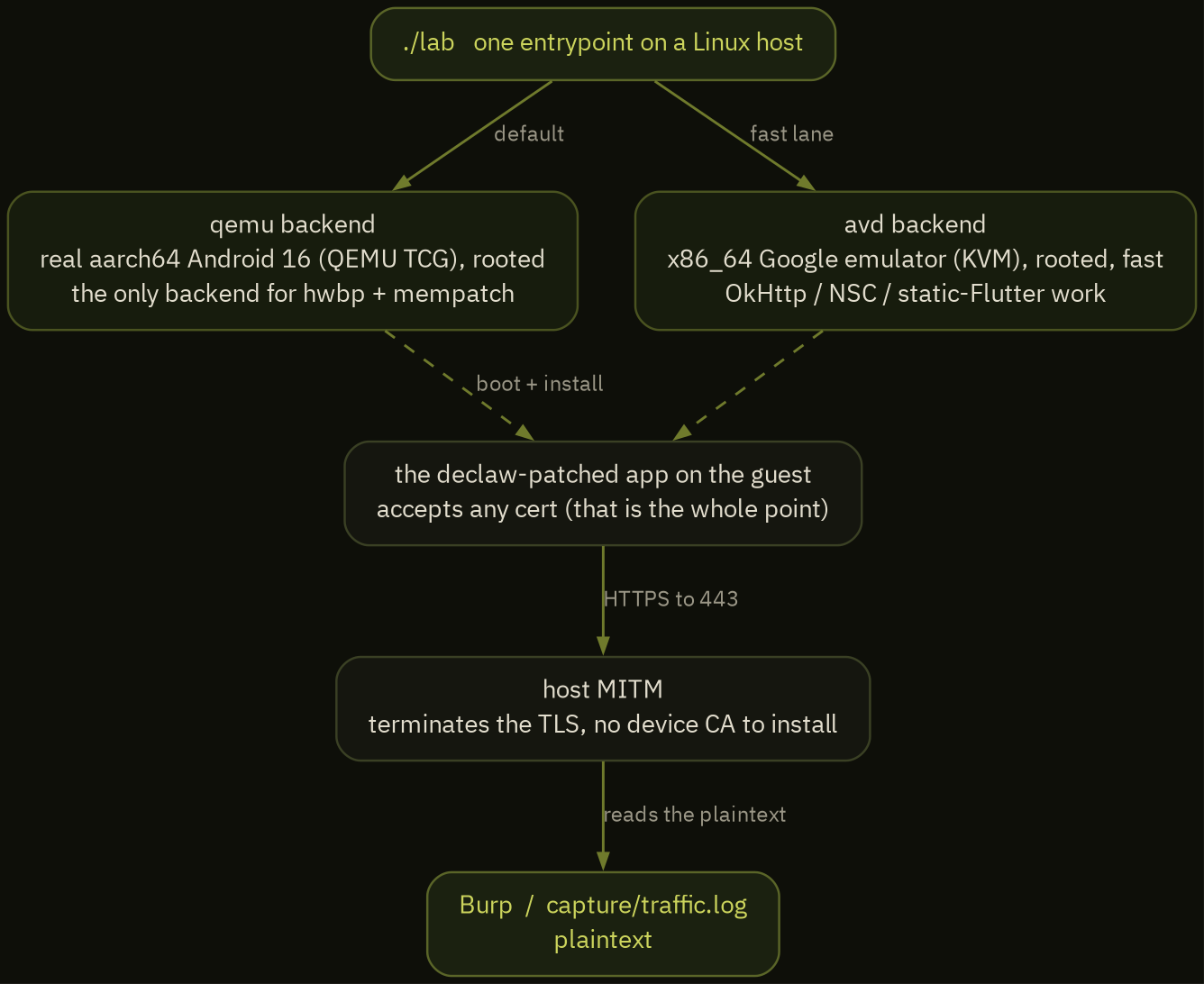
The no-device-CA part is the piece people expect to be there and it is not. Normally you install a proxy CA on the device and the app trusts it. Here the app trusts any cert because declaw already flipped that check, so the MITM can present whatever it likes and terminate the TLS. That is also the negative control baked into the lab: an unpatched app rejects the same cert, so if traffic shows up in Burp, the bypass is what put it there.
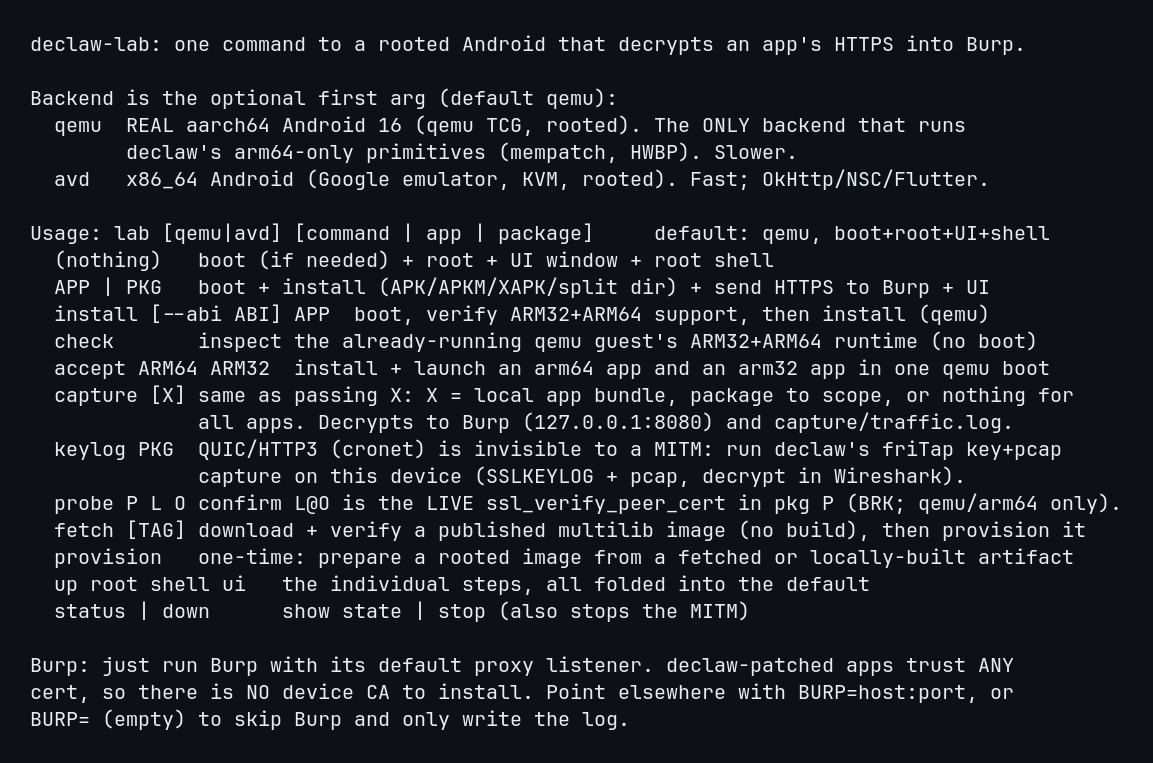
Requirements are all Linux-native and small: an x86_64 host with adb, then qemu-system-aarch64 and edk2 firmware for the arm64 backend, or a JDK and the Android SDK, which lab avd provision fetches, for the fast x86 lane. The arm64 image is a download, so there is no build budget to plan for.
reproduce it
The decoy pick is one command against any BoringSSL:
adb pull /apex/com.android.conscrypt/lib64/libssl.so
python -m declaw.find_verify libssl.so
# -> LIVE ssl_verify_peer_cert file offset: 0x5aa30
The zero-injection capture, on a rooted arm64 device:
declaw --mode hwbp <package>                                                          # NSS key log via the breakpoint
declaw --mode mempatch --offset com.android.conscrypt/lib64/libssl.so@auto <package>  # flip the live verifier
Name the library, not a bare libssl.so. An app that also bundles cronet maps stable_cronet_libssl.so, whose name contains libssl.so too, and a loose match patches that one instead, which reads back as a clean success on the wrong bytes (I did exactly this the first time). @auto then runs the finder inside the library you named and picks the live verifier over the decoy.
The ground-truth monitor self-test in the screenshot above, the sentinel target plus the wrong-offset negative control, is research/hwbp/mon_selftest.sh in the repo. It is how I keep the tool honest: a run that cannot recover a secret it planted, or that fires on a function it never called, fails the build.
what does not work, stated on purpose
A tool writeup that only lists wins is a sales page. Here is where it stops.
- 32-bit apps on the rig. The default arm64 image is 64-bit only. Launching a 32-bit process needs the optional multilib build, the heavy path I just took out of the default, and even there declaw’s mempatch and hardware-breakpoint helpers are arm64-only today. Proving a 32-bit app installs does not mean I can instrument its TLS.
- HTTP/3. Anything a target sends over QUIC is invisible to a TCP proxy, so mempatch buys you nothing there. Use the key-log path and read it in Wireshark.
- The hardest integrity checks. The anti-PairIP hook gets an agent past the antidebugger, but PairIP’s in-memory
.texthash is a separate wall it does not touch: that hash still catches friTap’s inline hooks, so against the most hardened apps a capture comes back with no keys. That is exactly the case hwbp and mempatch exist for, because neither places a hook, but it is per-build reverse engineering, not a button. - Stock non-rooted phones for the zero-injection rungs. Cross-process
perf_event_openand another process’s/proc/pid/memboth needptrace_may_accessto pass, which off a rooted device means same-uid orCAP_SYS_PTRACE, and stock Android shipsperf_event_paranoid=3with SELinux enforcing. hwbp and mempatch are a rooted-or-emulator capability. On a stock phone the answer is still the repackage path.
the repos
- declaw, the tool: github.com/UncleJ4ck/declaw. Patch, capture, hwbp, and mempatch, with
autoreading the app’s stack and picking the rung. - declaw-lab, the rig: github.com/UncleJ4ck/declaw-lab. The arm64 QEMU guest and the fast x86 emulator, one command to a rooted Linux-hosted device decrypting an app into Burp.
The unpinning hooks come straight from httptoolkit’s frida-interception-and-unpinning, the key-log extraction from friTap, and the repackaging from apktool and uber-apk-signer. The rungs past injection are the part I had to figure out the hard way, one wrong function at a time.